Resolution in CS2 - which is the best, 4:3 vs 16:9, how do pro players play?
Resolution in CS2: Find the perfect settings for yourself
In the world of esports, where every millisecond and pixel counts, choosing the right settings is crucial. One of the most frequently discussed topics is resolution. Players ask themselves: what is the best resolution for CS2? Should you stick with the classic 16:9, or follow in the footsteps of professionals and choose 4:3? In this article, we'll guide you through the intricacies of these settings, explain the differences between them, show you how the best players play, and help you find the perfect solution to improve your game.
Why is resolution so important in CS2?
Screen resolution, although seemingly just a technical parameter, has a huge impact on your gaming experience and achievements. It's not just about how sharp the image is, but also about how you perceive what's happening on the screen. Changing the resolution affects several key aspects:
-
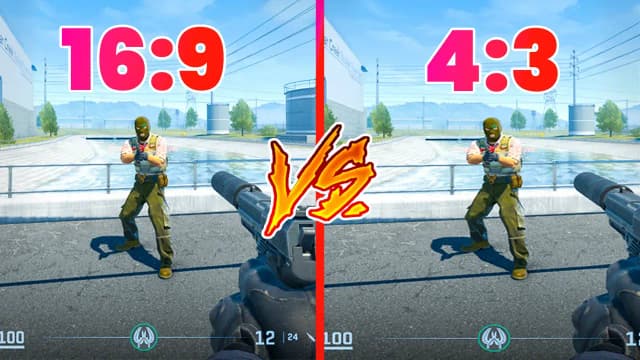
Enemy visibility: In lower resolutions, such as 4:3, character models become wider. For many players, this means it's easier to aim at them because they appear larger on the screen.
-
Game performance: A lower resolution, especially in 4:3 mode, usually translates to a higher frame rate (FPS). This is crucial, especially on older computers, where a stable framerate is essential for smooth gameplay.
-
Perception of space: Resolution affects the field of view (FOV). In 4:3 mode, the field of view is narrower, which can help you focus on the central part of the screen, but at the same time limits the visibility of what's happening on the sides.
-
Input lag: Although this is less critical in CS2 than it was in CS:GO, lower resolutions can minimally reduce latency, which is extremely important for professionals who strive for maximum responsiveness.
The answer to the question of what is the best resolution for CS2 often comes down to personal preference and habit, but understanding these mechanisms is the basis for making an informed choice.
4:3 versus 16:9: Key differences and impact on gameplay
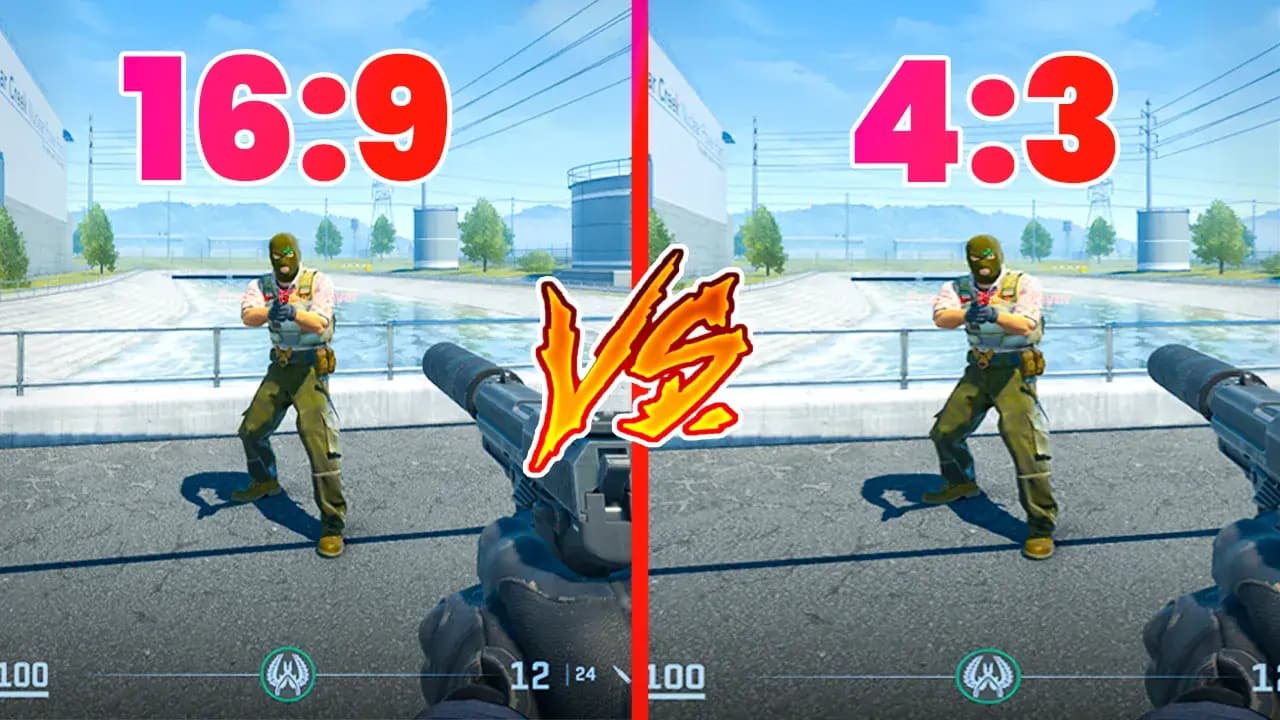
The two most popular aspect ratios in CS2 are 16:9 and 4:3. Each has its supporters and opponents, and choosing between them is often a fundamental decision.
16:9 Resolution – the full picture
The 16:9 format, known from widescreen monitors, is the default setting in most games. It is characterized by a wide field of view, which means you see more on the sides of the screen.
Advantages of 16:9:
-
Wider field of view: You can more easily spot enemies from the side.
-
Natural image: The lack of distortion makes the game look nicer and more realistic.
-
Comfort: Some players find that a wide screen is more comfortable for the eyes during long gaming sessions.
Disadvantages of 16:9:
-
Narrower character models: Aiming at enemies who are more "compressed" on the screen can be more difficult.
-
Potentially lower FPS: It usually requires more computer resources, which can be a problem on weaker machines.
4:3 Resolution – "wider" enemies and higher FPS
The 4:3 format, inherited from older monitors, is the choice of many professionals. Its main feature is that the image is "stretched" or has "black bars" on the sides.
Advantages of 4:3:
-
Wider character models: Enemies appear wider, which makes aiming and headshots easier.
-
Higher FPS: A lower resolution reduces the load on the graphics card, which is crucial for achieving a high and stable frame rate.
-
Easier focus: The narrower field of view allows you to focus on the center of the screen, which can help reduce distractions.
Disadvantages of 4:3:
-
Narrower field of view: You can't see what's happening on the sides, which can lead to being surprised from a flank.
-
Distorted image: The image is stretched, which requires getting used to and can feel unnatural.
The choice between 4:3 and 16:9 is a compromise between performance and what you find more comfortable for your eyes and play style.
Stretched vs. Black Bars – what does it mean and what to choose?
When you decide on the 4:3 format, you are faced with another choice: stretched image or black bars on the sides. Although both options have the same resolution, their impact on gameplay is completely different.
Stretched
-
What is it? The 4:3 image is stretched to the entire 16:9 screen. Character models and interface elements become wider.
-
How does it affect the game? Enemies move faster, which requires you to react more quickly and get used to a different aiming speed. Character models are wider, which theoretically makes it easier to hit them.
-
Who is it for? For players who value wider character models and are willing to sacrifice precision of movement for performance and target visibility. This is an option used by many aggressive players.
Black Bars
-
What is it? The 4:3 image is displayed in its original format, and black bars appear on the sides of the screen.
-
How does it affect the game? Character models are wider, but their movement speed is normal because the image is not stretched. The field of view is smaller, which helps with focus.
-
Who is it for? For players who want wider enemy models but don't want the image to be distorted. The black bars also reduce the field of view, which helps you focus on the center of the screen.
There is no single better option – it's a matter of choosing between a faster crosshair movement and a more natural, albeit narrower, image.
What resolution for CS2? An analysis of professional players' choices
Let's look at how the best players play to answer the question, what is the best resolution for CS2? What professionals use can often be an inspiration for other players.
The vast majority of professionals play in 4:3 resolution. This is mainly due to the wider character models and a higher number of FPS, which is crucial in dynamic gameplay. The most popular 4:3 resolutions are 1280x960 and 1024x768.
-
kyosuke: 1280x960
-
s1mple: 1280x960
-
m0nesy: 1280x960
-
ZywOo: 1280x960
-
donk: 1280x960
However, not all pro players use 4:3. Some, like ropz and NiKo, play in 1920x1080 (16:9) resolution. They do this because they value the wider field of view and lack of distortion, and their powerful computers ensure a stable, high frame rate anyway.
This shows that there is no one universally best resolution. The choice depends on your play style and hardware.
How to change the resolution in CS2?
Changing the resolution in CS2 is very simple. You can do it in two ways:
-
In the game menu: Go to Settings > Video. In the "Resolution" section, you can choose one of the predefined 16:9, 16:10, 4:3, or 5:4 formats. After selecting the appropriate format, a list of available resolutions will appear below.
-
Using launch options: In the Steam library, right-click on Counter-Strike 2, select "Properties", and in the "Launch Options" field, type
-w [width] -h [height]. For example,-w 1280 -h 960will set the resolution to 1280x960.
These are the simplest methods, thanks to which you can easily adjust the image to your preferences.
Summary
Choosing a resolution in CS2 is a personal decision that should be dictated by your play style and hardware capabilities. What is the best resolution for CS2 for you? If you have a powerful computer and you care about a wide field of view, 16:9 is a great choice. If, on the other hand, you want wider enemy models and a higher FPS, try 4:3.
Remember that many professionals use stretched 4:3, but it is not a rule without exceptions. The most important thing is to experiment and find a setting that makes you feel confident in the game.